Every project has a few tasks that decide when it finishes. Let one of them slip by a day, and the whole project finishes a day later. Those tasks are the critical path. This page explains what the critical path is, what float means, and why both matter, in plain words, with an everyday example and then a real building plan.
Part 1: The idea
What is the critical path?
The critical path is the longest chain of linked tasks from the start of a project to its finish. Because it is the longest chain, it decides the earliest date the project can finish.
Every task on the critical path has no spare time. If any of them takes longer, the finish date moves by the same amount. Every task that is not on the critical path has some spare time, and that spare time has a name: float.
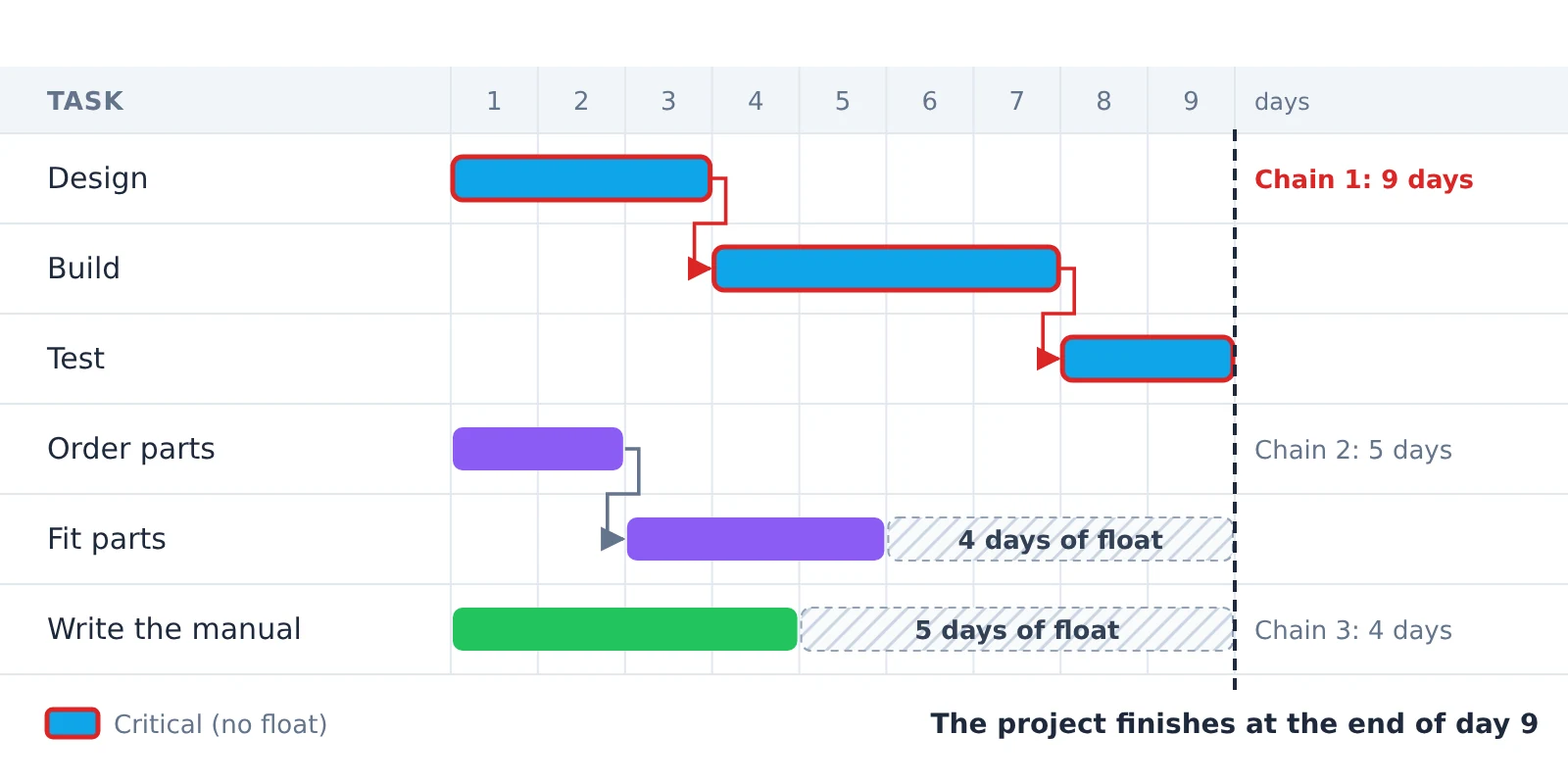
In the picture below, three chains of tasks start on the same day. The longest one takes 9 days, so it decides when the project finishes, and its tasks are the critical path. The two shorter chains finish early, so they have days to spare.
An everyday example: breakfast
You want boiled eggs and toast for breakfast, and you start both at the same time.
- The eggs take 10 minutes.
- The toast takes 3 minutes.
Breakfast is ready when both are done, so it’s the eggs that decide when you can eat. The eggs are on the critical path.
The toast has 7 minutes to spare. That is its float. If the toast takes 5 minutes instead of 3, breakfast is still ready on time.
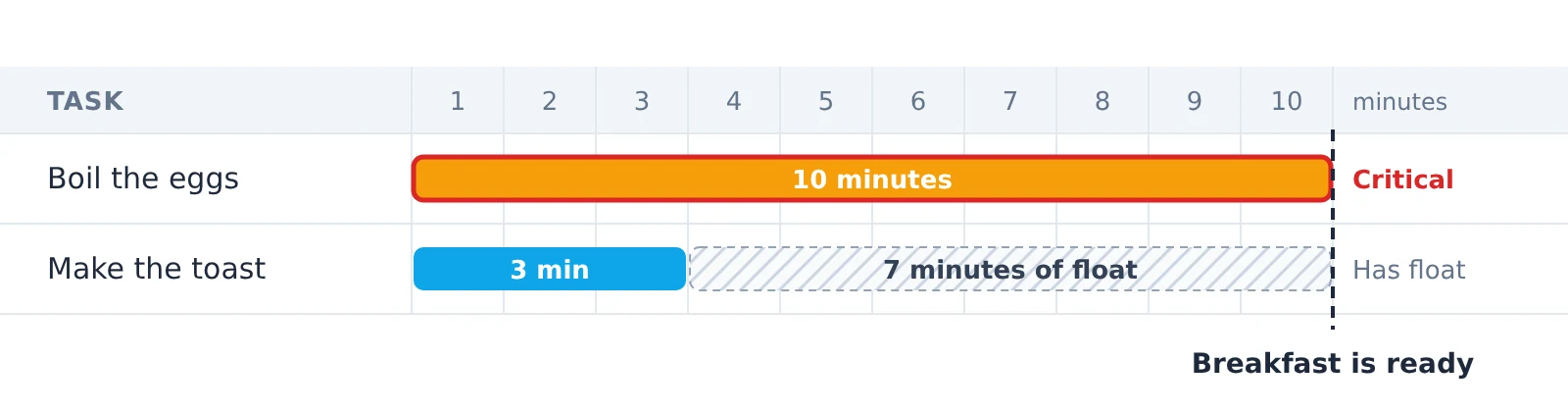
But if the eggs take 2 minutes longer, breakfast is 2 minutes late. A task on the critical path has no float at all, so any delay there delays the end.
What is float?
Float (also called slack) is how long a task can be delayed without making the whole project late.
- Total float is how far a task can slip before it moves the project’s finish date. This is the float most people mean.
- Free float (or free slack) is how far a task can slip before it delays the very next task.
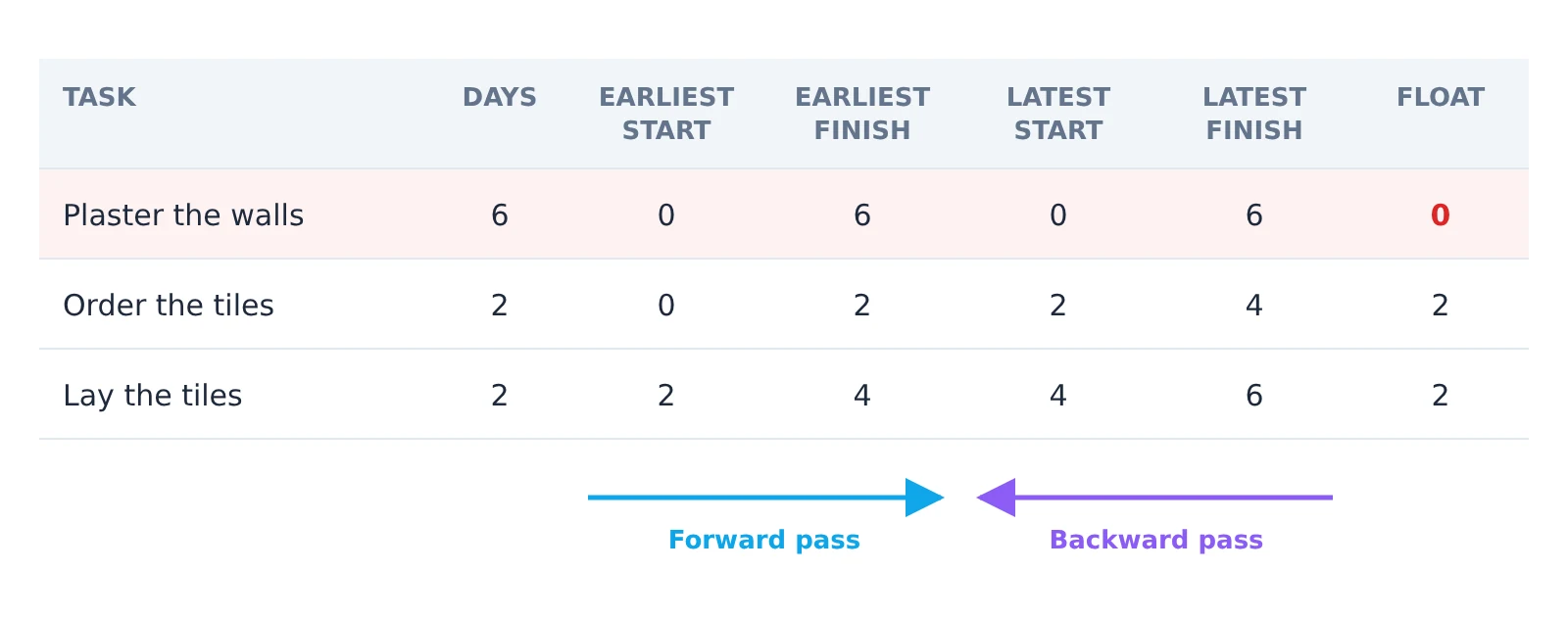
Here is the difference in a small plan. Plastering the walls takes 6 days and decides when the room is finished. The tiles have to be ordered before they can be laid, and the two jobs together take 4 days, so each has 2 days of total float. But ordering the tiles has no free float: if it slips by a day, laying the tiles starts a day later. Laying the tiles has 2 days of free float, because nothing waits for it except the end.
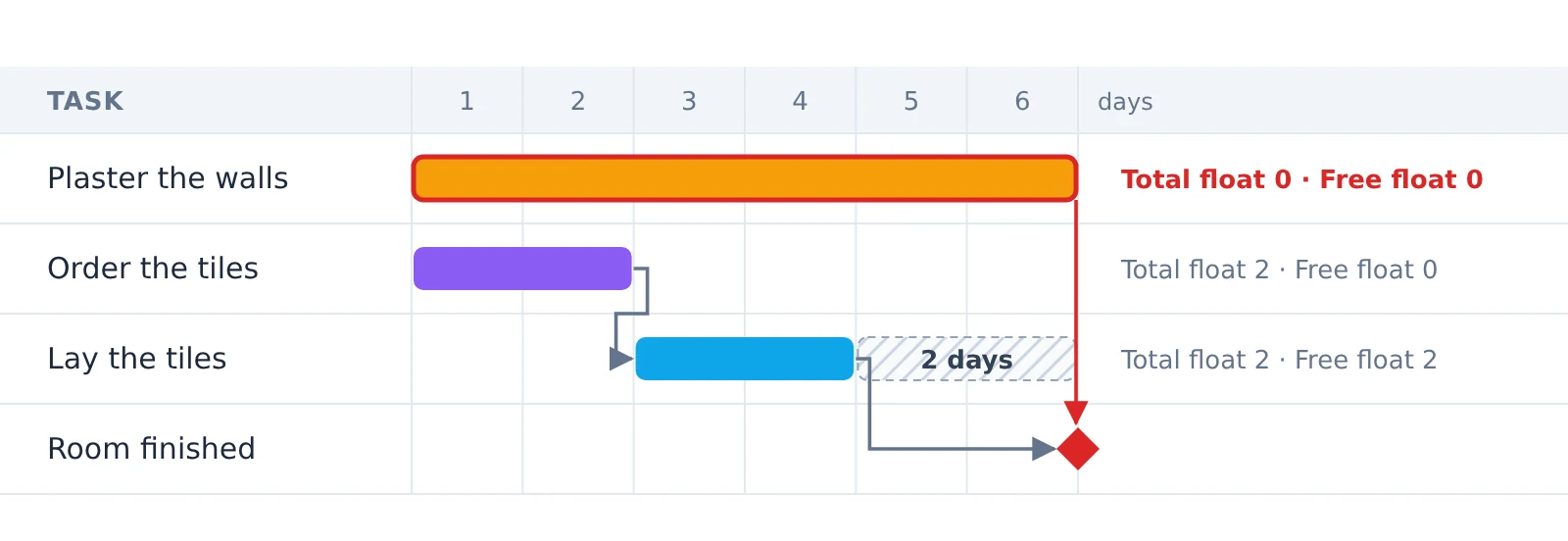
A task with zero total float is on the critical path. A task with some float is not, until it uses it up.
Part 2: In a real plan
The same idea in a real plan
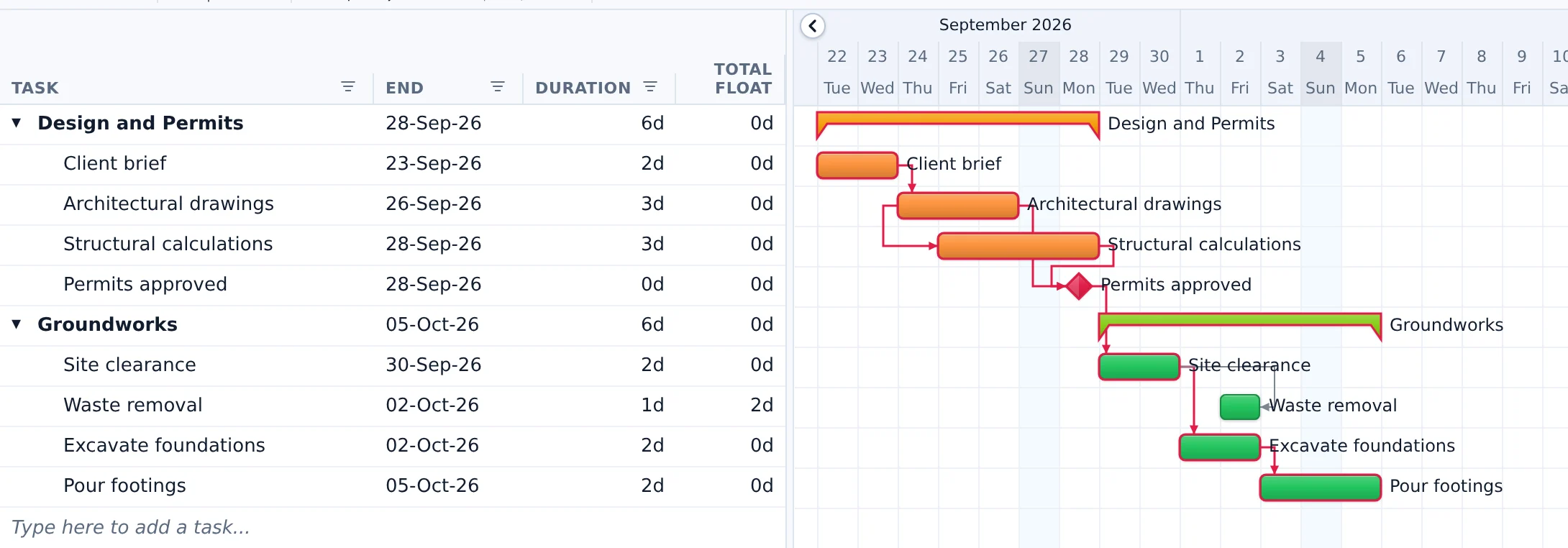
In the video above, the same idea is shown in a real house-building plan, the Oakfield Villa Build, in Desktop Plan. Almost every task is one chain: the client brief, the drawings, the structural calculations, the permits, and then the groundworks, one after another. So almost every task is on the critical path, and the plan finishes on Monday 5 October.
One task isn’t: waste removal. It only has to finish when the site clearance does, and nothing else waits for it. It has four days of float.
In the picture, the Critical path button at the top is switched on. Every task outlined in red shows 0d in the Total float column. Waste removal shows 4d.

- If the skip lorry comes two days late, waste removal finishes two days later. That is inside its float, so nothing else moves, and the project still finishes on Monday 5 October.
- If the lorry is five days late, that is more than its float. Waste removal is now on the critical path, and the whole project finishes a day later, on Tuesday 6 October.
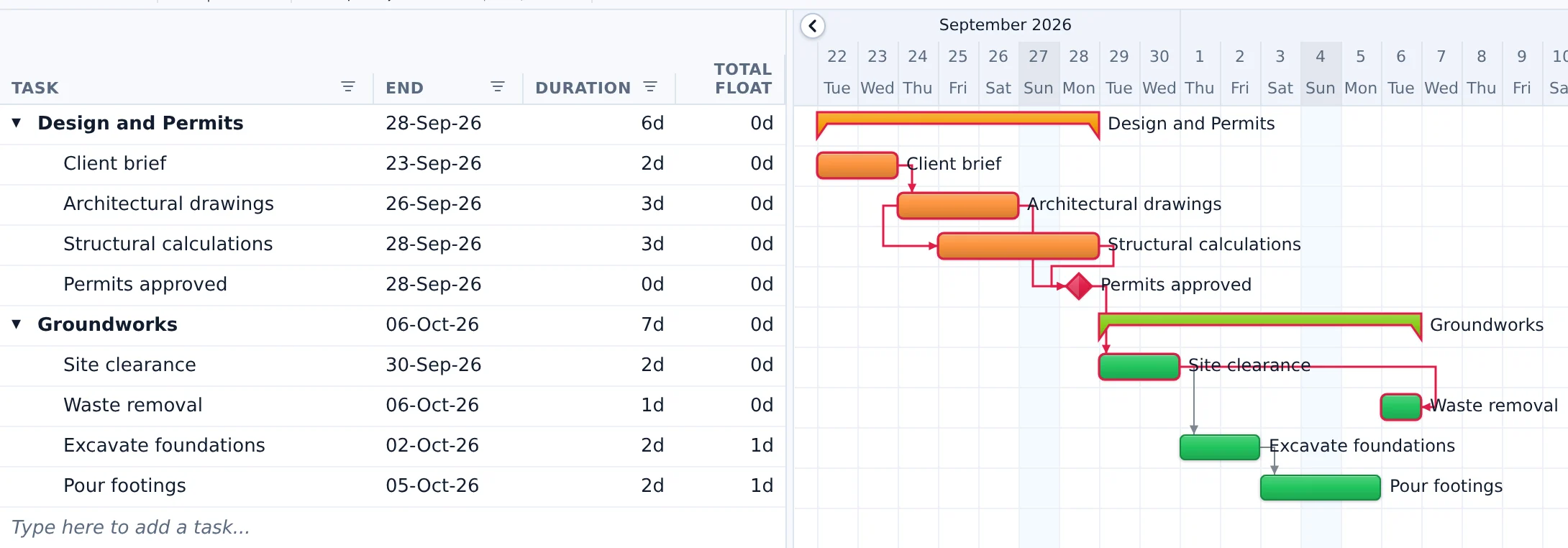
And something else happens: the last two groundworks tasks, which were critical, now have a day to spare. The critical path has moved. This is why the critical path is worth watching all through a project, not just worked out once at the start.
Why the critical path matters
When time is short, the critical path tells you where to look.
- Speeding up a task on the critical path can bring the finish date closer.
- Speeding up a task with float won’t change the finish date at all.
- A delay on the critical path delays the project by the same amount, so these are the tasks to watch most closely.
Part 3: Finding it
How to find the critical path
To find it by hand:
- List the tasks and how long each one takes.
- Link them: note which tasks must wait for which.
- Work forwards from the start to find the earliest each task can start and finish. The last finish is the project’s finish date.
- Work backwards from that finish date to find the latest each task can start and finish without making the project late.
- A task’s float is the difference between its latest and earliest start. The tasks with zero float form the critical path.
Here are steps 3 to 5 for the tiling example from the float section. The forward pass, from the start, gives each task’s earliest dates. The backward pass, from the finish on day 6, gives the latest. Plastering is the only task with zero float, so it is the critical path.
This is called the critical path method (CPM). Planning software does it for you, and keeps it up to date every time a date or a duration changes. In Desktop Plan, one click on Critical path outlines those tasks in red, and the Total float column shows the spare time of every task.
See how in our video, How to use the critical path in Desktop Plan →
Questions
Common questions
Can a project have more than one critical path?
Yes. If two chains of tasks are equally long, both are critical, and a delay on either one delays the finish.
Can the critical path change?
Yes, and it often does. A task that slips by more than its float joins the critical path, and tasks that were critical may then have some float. That is what happens to waste removal in the example above.
Is the critical path the same as the most important tasks?
No. The critical path is about time, not importance. A task can matter a great deal and still have float, and a small task can be critical simply because everything after it waits for it.
What is the difference between float and slack?
Nothing: they are two names for the same thing. Some tools and textbooks say float, others say slack.
Learn more
- The four kinds of link between tasks, and lag and lead: our article on task dependencies
- The critical path in the Desktop Plan user guide
- Download Desktop Plan and try it free
Find the critical path in your own plan
Desktop Plan is free to download. Link your tasks, click Critical path, and the Total float column shows how much spare time every task has.
Windows 10 and 11, 64-bit · macOS 13 or later